

Variables
If you want to save any data, and/or modify it later, you can use Variables.
Variables are used to store information to be referenced and manipulated. It is helpful to think of variables as containers that hold information.
GMetri experiences fully embrace “variables”. Variables allow you to gamify your experiences and orchestrate a variety of interactions. If you want to add interactivity, you would almost always use variables (along with Rules).
Types Of Values in Variables
Section titled “Types Of Values in Variables”Variables can store three kinds of values:
Using Variables
Section titled “Using Variables”Variable Rules
Section titled “Variable Rules”Sources of Variables
Section titled “Sources of Variables”Variables in GMetri come from three different sources:
Custom Variables
Section titled “Custom Variables”These are variables that you add manually to an experience. Go to Settings > Variables, select the type of value you want to store and click “Add Variable”. You can then rename the variable from the table below.
Checking the “Tracking” option allows you to later check the values stored for that variable, for every user, in Analytics Dashboard
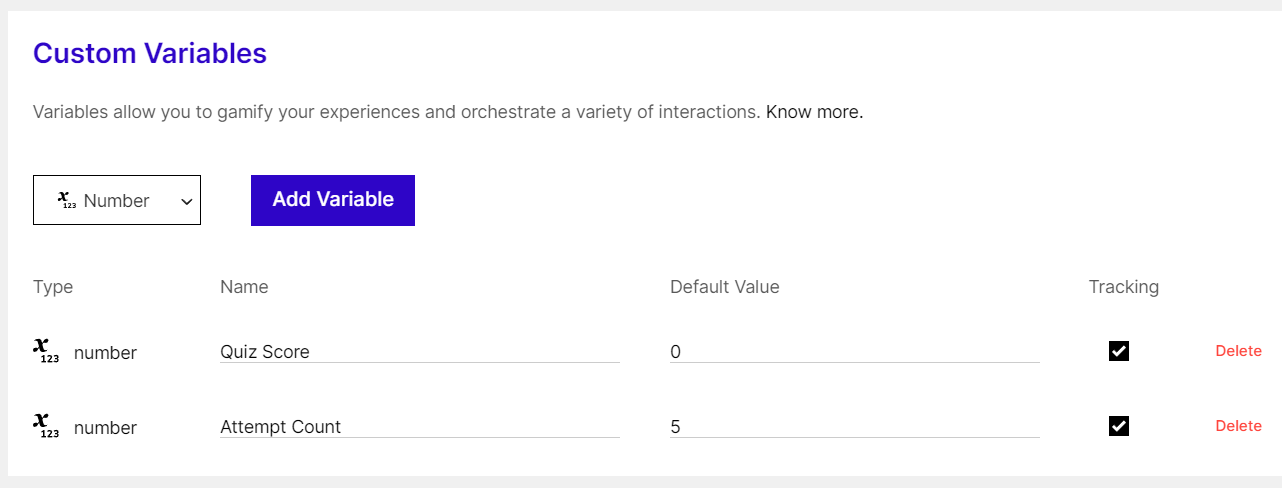
Adding Custom Variables
Global Variables
Section titled “Global Variables”Global variables are available for use across all experiences in a workspace. The value of this variable is shared across experiences for any viewer.
Check the following page to learn how to define Global Variables:
Autogenerated Variables
Section titled “Autogenerated Variables”These get added automatically. Check the list of autogenerated variables here: