

Quickstart
Account Creation, Project Listing, First Experience, Deploy
Here’s a short video to get you familiar with the GMetri Platform:
Create a GMetri Account
Section titled “Create a GMetri Account”- Start by creating a free account at https://portal.gmetri.com/register
- Login at https://portal.gmetri.com/signin
- The page you see after you log in is the Portal. The portal lists all your experiences.
- Click on any project to open the Experience Editor.
- Go through the Tutorials to go through the basics of creating a Metaverse Experience
Want to jump into your Metaverse?
Section titled “Want to jump into your Metaverse?”- Go through the other sections in Build Your Metaverse to delve deeper
Step 1: Login and click on “Enter Room”. There is no step 2.
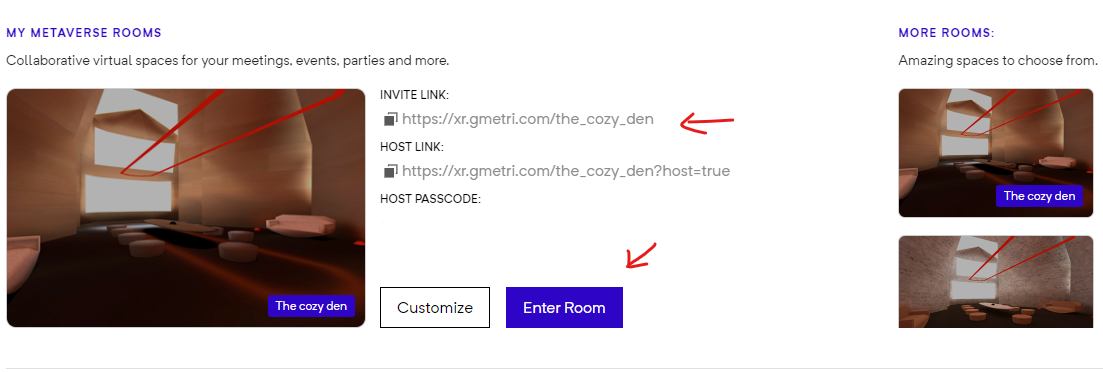
My Metaverse Rooms
Copy this Invite Link, and share it with your friends, to have a chat with them in the metaverse. Use “Join Call” to start an audio session.
How can I modify the room?
Section titled “How can I modify the room?”This is where the real fun begins!
For a quick intro to GMetri head over to tutorials. Go through Build Your Metaverse to get a lay of the GMetri land.
To get a hand-hold session that goes through both basics and advanced topics of GMetri, join our Free Webinars.
See you on the other side!