

Publishing
Once you’re happy with your experience, you can share it with your audience by creating a deployment using the “Publish” tool.
You can create multiple deployments for every experience you create.
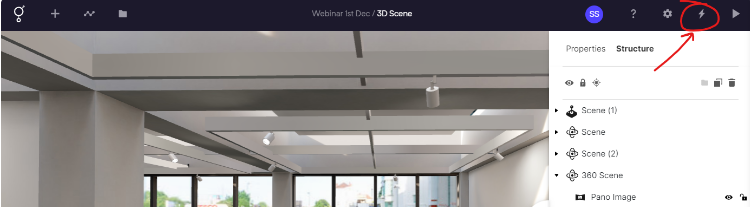
Publishing your experience
To publish your experience simply click the ‘Publish’ button.
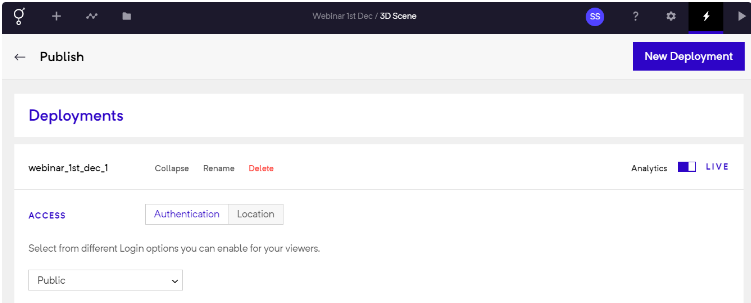
Deployments
You can share your deployment with your audience in multiple ways
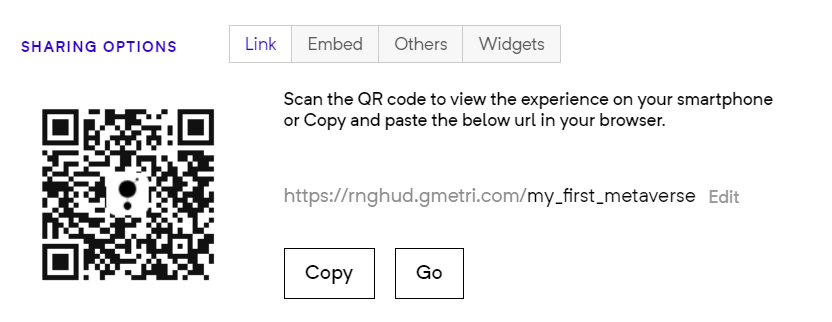
Publish Link and QR Code
For every individual deployment, you can customize the following:
- you can share the deployment link using different methods
- you can choose to authenticate differently from other deployments
- you can choose different collaboration features
- you get a unique analytics link (top right of the deployment section)
- you choose a different location tracking setting
Location Tracking
Section titled “Location Tracking”Enabling this shows a map in analytics showing you the approximate location of viewers.