

String Substitution
Many text fields and rules in GMetri support substitution out of the box.
What is String substitution?
Section titled “What is String substitution? ”Let’s say you have Text element, and you want to show the user his/her score, or a value that you captured earlier. How can you do that?
By adding the following in the text element:
Hi {{firstname_var}}!
Your current score is {{score}}
and the values in the text element will get replace with the corresponding variables.
What are the values that I can substitute?
Section titled “What are the values that I can substitute?”Apart from #custom-variables, #global-variables and #autogenerated-variables, there are a few additional things available to you that you can substitute. These are:
viewer_token: The token used to authenticate the viewersession_uuid: The unique identifier for this session. Unique for every page load.organization_slug: The identifier for the current workspacedeployment_slug: The identifier for the current deploymentscene_id: Contains the current scene iddeployment_url: The URL that the viewer uses to access this experience
Example
Section titled “Example ”You can use variables in text elements through substitution.
Let’s say you have a Number variable with the name count. To view the value of count in a text element, you can add the text Count: {{count}} in the text element. You will then see something similar to what you see in the experience below.
To show the value of a variable in a Text element, add the name of the variable you want in double curly brackets like {{variable_name}}
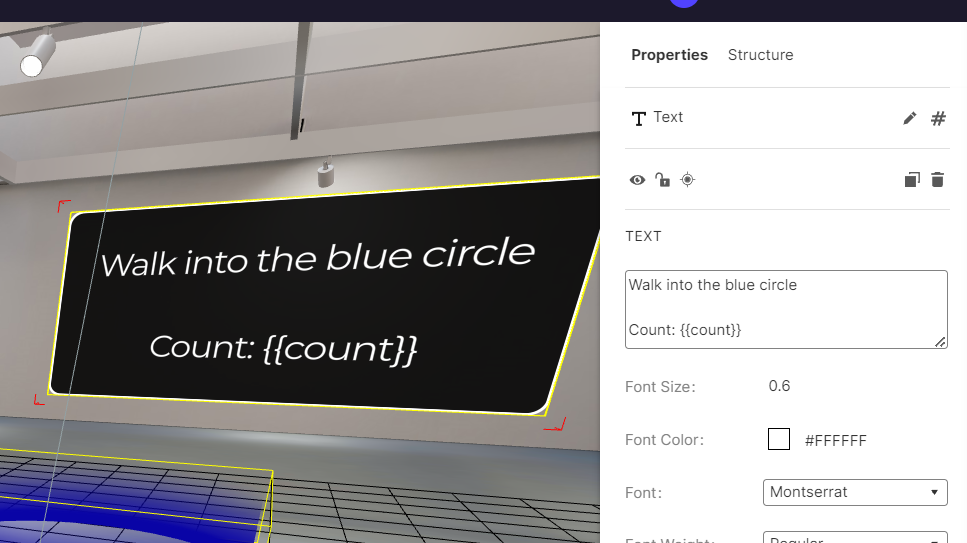
Variable Substitution